Licensing FileHold
FileHold software must be activated before it can be used. It may need to be re-activated if there are changes to your FileHold server or your licensed options such as adding more users. You must have a current FileCare subscription in order to re-activate your software. You must log in to FileHold with a user that has the system administration role in order to work with license information.
FileHold Cloud customers and customers with support users enabled cannot request system licenses unless they are a support user.
If you have a current FileCare subscription and need assistance in following these steps, please contact support@filehold.com. Licenses are issued by the licensing team, but support can help you to prepare the request where needed.
What do you need to do?
Thanks for adding on to your system! All you need to do now is request and install a new license file with your updated options. Choose the "I need a license for the FileHold server" heading for the gory details. When you are asked to choose the reason, select Other. In the details include your invoice or quote number and any other details you think are relevant. Make sure your name, company name and email address are correct.
This email is no cause for panic and it does not mean your system is not functioning. Normally, if we detect a problem in your license we automically grant you a seven day grace period in your license. If we had given you a temporary license so you could try a new feature, just reinstall your old license file. If you are trying out FileHold, check with your account manager about extending your trial. If you cannot find your old license file or if your account manager has authorized your extension, choose the "I need a license for the FileHold server" heading for the detailed steps to request a replacement license. Choose the Expired license reason.
If you recently moved or updated your server, this could the cause for the email warning. Request a new license as above and choose the Hardware change reason and include any additional details to explain what you think happened.
Somehow the warning email did not make it to your inbox telling you about the seven day grace period and now your users cannot access the system. Not too worry. We will help you get up and running as soon as possible. Choose the "I need a license for the FileHold server" heading for the detailed steps to request a replacement license. Choose the Expired license or Hardware change reason with any details you think may be relevant. If it is outside of the normal licensing team hours of 8 am - 4 pm Pacific time and you have a current FileCare subscription, send an email to support@filehold.com. They may be able to help you with an emergency license file.
- In the Web Client, go to Administration > License > Information. The System Information displays your current license information.
You can get directly to the license page from the FDA. Go to Administration > License Information.
- Click Request a License.
- Fill out the following information in the Request a License form:
- Select the reason for the license request in the “Please provide the reason you are requesting a new license file” list. Choose a non-production license for test, backup, or development servers. Partners should choose not-for-resale for their internal demo servers. Choose trial if you are installing your own server to trial the software. Version upgrade, expired license, and hardware change will normally be chosen automatically when needed.
- Enter any details for the license request in the “Please provide the reason details”. This is an optional field. This is where you can provide additional information for the licensing team to identify new licenses or changed licenses. You can include things like purchase order or invoice numbers or other special information here.
- Enter the name of your organization. This is a required field. For fastest response, this should match the name we have on file for you.
- Enter the email address of the user who will be receiving the license. This will default to the currently logged in user’s address. This is a required field.
- Enter the contact name. This will default to the currently logged in user’s name. This is a required field.
- Select one of the following request methods:
- Send the request directly to FileHold — Sends a web request directly to FileHold. This is the preferred method if you have an Internet connection available.
- Open email client to send request — Opens an email using the default email client on your workstation with the license details and addressed to licensing@filehold.com.
- Copy the request to the clipboard — The text for the body of the email displays below. Copy and paste the contents into an email and send to licensing@filehold.com. Use this method if your server does not have access to the Internet.
- Click Cancel to return to the License information page. The licensing team will email a new license to the contact in the request. The license file must be saved locally in order to install the license.
- Copy and paste the hardware key into an email.
- Make a screen shot of the license information page and paste that in the email.
- Include any additional information that is important for your request. If you have multiple FileHold servers make sure you specify the server you need a license file: test, production, backup, etc.
- Send the email to licensing@filehold.com.
If you have FileHold 14.x and you have an email client configured on your workstation you can simply press the Launch Email client to Send Hardware Key button. Do not forget to paste the screen shot of the license information page into the email.
To retrieve your hardware key
The signature (hardware key) is available on the license information page. The method to get to the license information page is dependent on your version. You must login to the web client as a system administrator in order to see your license information page. Ensure your server is set to the correct date and time before you retrieve the hardware key.
- We have FileHold 14.2 or higher
- Go to Administration Panel > System Management > License Information.
- If you are using the FDA you can automatically open your browser and go directly to the license information page by selecting Administration > License Information or choosing the License Website link from the system activation error message.
- We have FileHold 14.1 or lower
- Go to System Admin > Global Settings > License Information.
- We do not know what version we have
- Go to the web client login page. Your version is displayed in the upper right hand corner.
Once you receive the new license file via email, you can apply the license using the following steps.
Starting with version 15 there are two different types of license files you may receive from FileHold Systems Inc. Use this procedure for installing system licenses. These end with the file extension .license. If you have a license ending in the .otlic extension you can use the Courier license procedure.
- In the Web Client, go to Administration > License > Information. The System Information displays your current license information.
- For versions less than FileHold 14.2, go to System Administration > Global Settings > License Information.
You can get directly to the license page from the FDA. Go to Administration > License Information.
- Click . The license file is emailed to the contact email on the request form. Ensure the license file is saved locally so that it can be installed.
- For versions lower than FileHold 15, click Add or Replace a License or Add CALs.
- Click Choose File and select a local copy of the new license file provided in the email.
- Once the license file is located, click . The new license information will be displayed on the screen and a message will indicate the license is valid.
- Click to apply the new license.
Updating a license may cause certain passwords to be reset. After a new license has been added, you should verify that your passwords for the Outbound Email Settings and the external database passwords for any metadata fields that are the type drop down database or schema lookups are still valid.
To activate the document management system license, the FileHold server date and time settings must be set to the current date and time.
You do not need to reboot or restart the web server after a new license is added.
The licensing team is generally available at licensing@filehold.com from 8:00 am until 4:00 pm Pacific time Monday to Friday, except for some major holidays. Please schedule installation, upgrades, and virtualization projects accordingly. FileHold partners should ensure they include the end customer details in their request to licensing.
Make sure that filehold.com is on your email security white list or authorized list to ensure the license file does not get trapped by your SPAM filter.
Licensing Frequently Asked Questions
- FileHold has just been installed for the first time.
- FileHold has just been upgraded.
- You just received a email notification from your FileHold server that the license is no longer valid and you have a 7 day grace period to update your license.
- The health checker reports a license error.
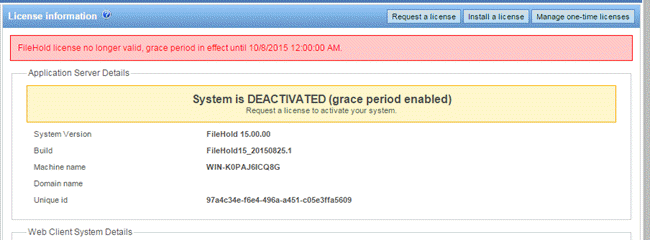
- The license information page says System is DISABLED, Is system activated false, or System is DEACTIVATED (grace period enabled).
- Your users receive the message System is not activated - please contact FileHold system administrator or The FileHold system is not activated please contact your system administrator to enable the license when they attempt to login.
The following are some potential causes for why your license file is no longer valid.
- You had a temporary license and the expiry date has past.
- You upgraded or repaired your server hardware.
- Your virtual host or cloud environment moved your FileHold server to a new host.
- A Windows Update patch made your server hardware appear as though you have new hardware. This happens rarely.
The license information area displays a summary of all the enabled features, number of registered user licenses, number of concurrent sessions, number of viewers, the software version, hardware key, and other information pertaining to the license. The date the license was issued and the license time limit is also shown. If the FileHold license has been fully paid then the time limit will be “unlimited”.
In the Application Server Details area a status is shown indicating that the system is activated, deactivated with a grace period, or disabled.



If the Outbound Email Settings are not configured, a message is displayed at the top of the licensing screen. Click the link to configure the outbound email settings.

The following table describes the server details of the licensing page.
| Field | Description |
|---|---|
| Application Server Details | |
| System Version | The version of application server that is installed. |
| Build | The current build number of FileHold. See FileHold Software Versions for more information. |
| Machine name | Name of the server that FileHold is installed on. |
| Domain name | The name of the domain the server is on as reported by the system. |
| Unique ID | A unique identifier given for each installation of FileHold. |
| Web Client System Details | |
| System Version | The version of web server that is installed. |
| Build | The current build number of FileHold. See FileHold Software Versions for more information. |
| Machine name | Name of the server that FileHold is installed on. |
| Domain name | The name of the domain the server is on as reported by the system. |
| License Details | |
| Registered to | The name of the company that the license is registered to. |
| License issued | The date the license was issued by FileHold. |
| License time limit | The date and time the license expires or unlimited if the license never expires. This value is not relevant for FileHold Cloud customers. |
| Description | The description that was included by the licensing team when the license was created. |
| Support users | This value could be enabled or disabled. When it is enabled, system administrators have some of their functions restricted as certain operations are only available to support users. When a domain name appears here, support users will always come from this domain. FileHold Cloud customers will typically see "filehold.com" in this location. |
| Full Concurrent sessions | The number of concurrent sessions available to users assigned a Full registered user account type. Concurrent access licenses determine how many users with read-only permissions and higher can log into FileHold at the same time (concurrently). |
| Full Registered users | A Full user license is a user that has been assigned to a group with a role of read-only or higher. When a Full user logs in they consume a full concurrent session. |
| Portal alias users | A portal alias user is a user assigned to a group with a role of “limited” and is used in conjunction with the Anonymous portal. Portal alias users consume limited concurrent sessions. |
| Limited registered users | A limited registered user is a user assigned to a group with the role of “limited”. Limited registered users consume the limited concurrent sessions. |
| Limited concurrent sessions | The number of concurrent sessions available to users assigned a Limited registered or Portal alias user account type. Concurrent access licenses determine how many users with limited permissions can log into FileHold at the same time (concurrently). |
| Capture concurrent sessions | The number of SmartSoft Capture licenses purchased for scanning. |
| Capture Plus concurrent sessions | The number of SmartSoft Capture Plus licenses purchased for scanning. |
| Available Courier use units | The sum of all license units currently available for Courier. |
| Per user licenses | |
| Number of FileHold viewer level 1 licenses | Number of viewer licenses for viewing of PDF, image, and docx (Microsoft Word) file formats in both the FDA and Web Client. |
| Number of FileHold viewer level 2 licenses | Number of viewer licenses for viewing extended file formats, annotations, watermarks, comments, and document assembly. |
| Number of FileHold viewer level 3 licenses | Number of viewer licenses for using redaction plus all of the level 2 features. |
| Web scanning licenses | The number of licenses for scanning documents through the Web Client. |
| License options | |
| External identity providers | The number of external identity providers that can be configured in the system at one time. For example, if your users will authenticate with Microsoft Entra and Okta, you would need two of these licenses. |
| SharePoint client concurrent sessions | Enabled or disabled – SharePoint integration is enabled or disabled in the system. |
| Workflow module | Enabled or disabled – The workflow module is enabled or disabled in the system. |
| Active Directory module | Enabled or disabled – The active directory module is enabled or disabled in the system. |
| FastFind | Enabled or disabled – The FastFind feature is enabled or disabled in the system. |
| Print-to-FileHold | Enabled or disabled – The Print-to-FileHold feature is enabled or disabled in the system. |
| Enhanced Repository | Enabled or disabled – The Multi-document repository feature is enabled or disabled in the system. |
| Custom Providers & Queries | Enabled or disabled – When enabled, allows for lookups into file types other than databases. |
| OCR Module | Enabled or disabled – The server side OCR feature is enabled or disabled in the system. |
| Image/PDF compression | Enabled or disabled – PDF and TIFF documents can be compressed to a smaller file size if this option is enabled. |
| Automatic Document Importation | Enabled or Disabled – The ADI feature is enabled or disabled in the system. |
| Digital Signature | Enabled or disabled – If this option is not enabled, then Adobe Acrobat Sign is not available for use. The message “The external signature feature is a license option. Contact sales@filehold.com to enable this feature” appears if configuration is attempted. |
| Allow L2 viewer for portal alias | Enabled or disabled - If this option is not enabled, then a FileHold viewer level 2 license cannot be assigned to a portal alias user. |
| Allow server plugins | Typically disabled. The FileHold professional services team will enable this option when needed. |
| Allow FDA plug-ins | Typically disabled. The FileHold professional services team will enable this option when needed. |
| Allow rebranding of the Web Client | Typically disabled. The FileHold professional services team will enable this option when needed. |
| Allow rebranding of the FDA | Typically disabled. The FileHold professional services team will enable this option when needed. |
| Two-factor providers | A list of two factor authentication providers that are directly enabled in FileHold. |
| Teams integration | Enabled or disabled - If this option is enabled, user with Microsoft 365 licenses for Microsoft Teams and authenticated with Microsoft Entra, will be able to exchange files with their Teams. |
| Add-on options | A list of add-on options that are license. These features are not a core part of FileHold, but they can be installed as an add-on. For example, the Workflow Extender. |
| Legacy license options | |
| Number of Brava Office Viewer named licenses (includes PDF/Image Viewer) | Number of viewer licenses for viewing of a number of file extension types. This is a legacy feature and is not available for purchase. |
| Number of Brava Office Viewer With CAD Support named licenses (includes PDF/Image Viewer) | Number of viewer licenses for viewing of a number of file extension types including AutoCad formats. This is a legacy feature and is not available for purchase. |
| Number of Brava Office Viewer (Engineering Edition) named licenses (includes PDF/Image Viewer) | Number of viewer licenses for viewing of a number of file extension types including several engineering file formats. This is a legacy feature and is not available for purchase. |
| Legacy redaction module | Enabled or disabled – The redaction feature is enabled or disabled in the Brava viewer. This is a legacy feature and is not available for purchase. |
When a license expires or the hardware key no longer matches the server hardware configuration, an email entitled Attention is Required for Your FileHold License or Attention Required: Your FileHold License has Expired will be sent automatically to the email addresses of the System Administrators of FileHold. The content of the email includes the when the 7 day grace period ends. The system continues to work normally until the grace period expires. To ensure that you receive these notification emails, check the Outbound Email Settings to ensure it is configured. . When the grace period is effect, the notification is sent out on a daily basis through the FH email notifications (daily summary) scheduled task.
Once the grace period expires, the system becomes disabled unless a new license key is uploaded. If you receive the email, use the License Request procedure above to get a new license key. Your license information page will be updated with the following message when the grace period is active.
Agreements
In addition to providing information and allowing you to maintain your FileHold license, the license information page includes a link to the agreements associated with your license. This includes the list of third-party licenses associated with FileHold.
- Go to the license information page from the administration screen via System management > License > Information.
- Click . You will be taken to a web page with the agreement details for your version.